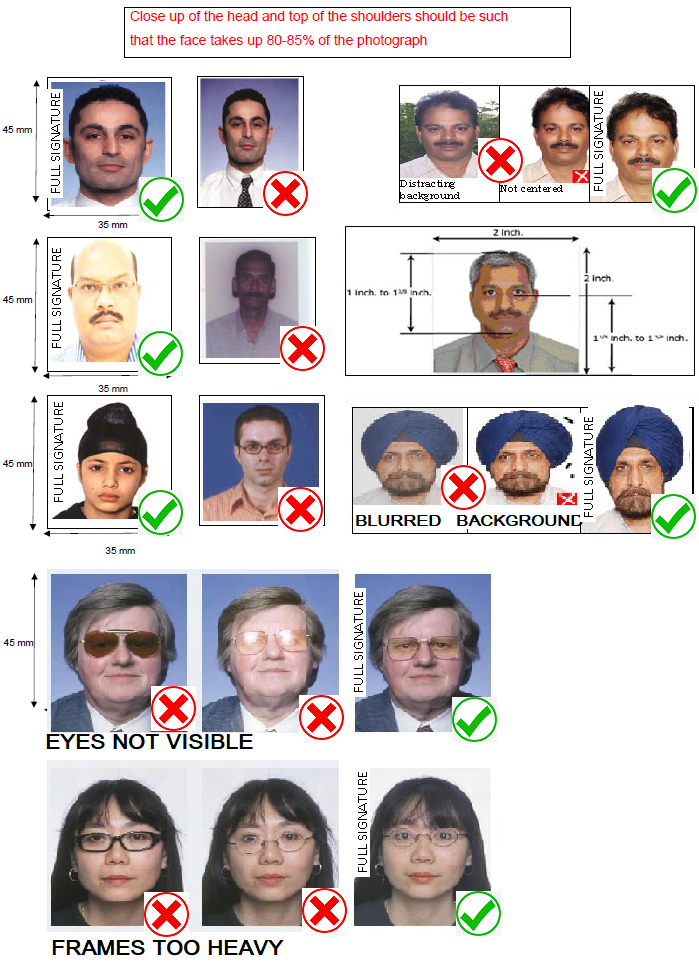
FOLLOW GUIDELINE PROPERLY TO AVOID REJECTION
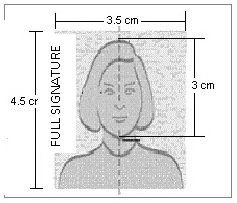
- Photograph must be a recent passport size colour picture.
- Make sure that the picture is in colour, taken against a light-coloured, preferably white, background.
- Look straight at the camera with a relaxed face.
- Ensure that 70%-80% face and 30%-20% body is covered by the photograph
- Photograph should be self signed and the signature should be full signature
- If the picture is taken on a sunny day, have the sun behind you, or place yourself in the shade, so that you are not squinting and there are no harsh shadows.
- If you have to use flash, ensure there's no "red-eye".
- If you wear glasses make sure that there are no reflections and your eyes can be clearly seen.Use a light frame or avoid spectacles if possible
- Caps, hats and dark glasses are not acceptable. Religious headwear is allowed but it must not cover your face.
- For scanning, the photo should be scanned in image format.
- Set the scanner resolution to a minimum of 200 dpi (dots per inch) and color to True Color before scanning.
- While scanning, make sure that the photograph is placed properly on the scanner such that the face is visible clearly and picture is straight as shown above.
- After scanning, crop the scanned image to the edge of the photograph.
- The dimensions of the photograph shall be 3.5cm width by 4.5cm height (132px width by 170px height).
- Select only .JPG, .JPEG or .PNG files.
- Keep your filesize with in 50KB
- Resize your file in a way to maintain legibility
- In case the photograph is unclear, the concerned person may reupload his photograph prior to submission.
People using MS Windows/MS Office can easily obtain photograph in .JPEG, .JPG or .PNG format by using MS Paint or MS Office Picture Manager.
Scanned photograph in any format can be saved in .JPEG, .JPG or .PNG format by using ‘Save As’ option in the File menu.
By using crop and then resize option in the ‘Image’ menu the image can be cropped to the edge of the photograph. Similar options are available in other photo editors also.